







Knife Storm
 Developer: RHM Interactive
Published: August 26, 2019
Controls: Touch / Click
Game Technology: html5, Construct 2
Compatible Devices: Mobile (Android)
About Knife Storm
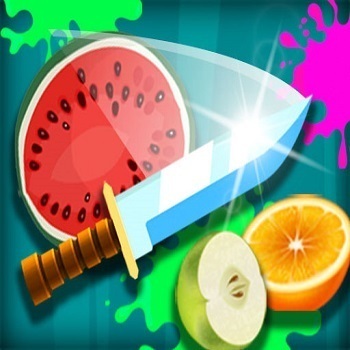
Knife Storm hurls you at spinning tables, flying fruit, and bomb-dodging knife challenges. One round may ask for careful knife throwing into a rotating target, while the next turns into a fast fruit slicing test with sudden black bombs cutting through the screen. The danger is sharp and immediate: throw too early, and a flashing knife blade smacks into another handle instead of the wood.
This HTML5 arcade game was developed by RHM Interactive using Construct 2, and it runs through browser play on Desura with support for mobile Android. The game is built around three separate tests rather than one repeated loop: Classic mode, Shoot mode, and Ninja mode. That variety matters because a calm shot on a spinning wooden table feels nothing like chasing bursting fruit under a ticking timer.
Knife Storm also includes solo play and 2-player mode, which gives the arcade knife challenge a stronger replay hook. In solo play, the pressure comes from beating your own timing mistakes. In the 2-player knife battle, one bad move can hand the round away instantly, and that near-miss feels even sharper when another player is waiting for you to slip.
Gameplay
Classic mode centers on timing mechanics and a rotating target. You wait for an opening, release the blade, and hope it lands cleanly without touching another knife. Beginners often lose here by throwing too fast, especially when the target slows for a split second and then swings past the safe gap.
Shoot mode changes the rhythm. Instead of studying rotation, you track flying fruit, avoid bombs, and watch the timer shrink with every hesitation. If a sudden black bomb drifts into your throw line, the safe shot can turn into a failed round before your eyes catch up.
Ninja mode feels looser and more reactive because fruit slicing becomes the main focus. You move with arcade reflexes, cutting through fruit while staying alert for hazards. Players who like precision aim in Master Archery Shooting may enjoy how this casual action game rewards patience before the release.
How to Play
Start with Classic mode if you are new to the timing-based thrower. Watch the rotation for one full turn before throwing, because the safest opening is often not the first one you see. One rushed tap can send the knife into an old blade, ending the clean streak with a hard stop.
In Shoot mode, aim at fruit paths rather than the fruit’s current position. The difference is small but important: rotating targets reward waiting, while flying targets reward leading the shot. If the ticking timer gets in your head, you may fire into empty air or clip a bomb by a few pixels.
Ninja mode is better once you are comfortable reacting quickly. Use wider slices for groups of fruit, then tighten your motion when bombs enter the screen. Fans of fast movement challenges like Geometry Vibes X-Ball will recognize that one wrong twitch can turn a clean run into a sudden reset.
Controls
- Touchscreen — tap, swipe, or drag to throw and slice where supported
- Mouse — aim, click, or move to cut fruit in supported modes
- Keyboard — use assigned keys for supported player actions, especially in 2-player mode
Features
The three modes give the game its strongest variety. Classic mode is about clean placement, Shoot mode adds timed targets and bombs, and Ninja mode turns the screen into a freeform slicing lane. Each mode punishes a different mistake, so a player who masters rotation can still panic when fruit crosses from two directions.
The visual cues are sharp without being cluttered. Flashing knife blades mark your last throws, bursting fruit gives instant feedback, and sudden black bombs stand out as danger signs. When the screen fills with motion, reading those cues quickly can save a run from collapsing.
Input flexibility also helps. Touchscreen controls feel natural for slicing and tapping on mobile, while mouse and keyboard controls give desktop players a steadier setup for aiming or local play. That accessibility makes quick casual sessions easy to restart, especially when a 2-player rematch begins seconds after a narrow loss.
Similar Games
If you enjoy sharp timing, Desura has other arcade picks that test aim, release timing, and reaction speed. Archer Warrior leans into projectile accuracy, while Teen Titans Go: Bad Guy Blitz brings faster enemy-dodging pressure for players who like constant movement. For broader reflex practice, browse Shooting Games where timing a shot can decide the whole round.
- Basketball Challenge — a precision arcade game where timing and aim decide whether the shot lands cleanly. It matches the same “wait, release, regret or celebrate” rhythm.
- Mafia Billiard Tricks — a cue-skill game built around angles, patience, and controlled shots. Good for players who enjoy lining up a move before making one risky strike.
- Bowling Fun 2019 — a lane-based aiming game where small input mistakes change the result fast. It shares the tension of committing to one throw and watching it play out.
Advantages
- Three distinct modes create replay value without relying on one repeated knife pattern.
- Solo play lets you practice timing, while 2-player mode adds pressure from direct competition.
- Touchscreen, mouse, and keyboard options make the arcade knife challenge easier to approach on different devices.
- Fast failures teach clear lessons: wait longer, lead the fruit, or keep your blade away from bombs.
Frequently Asked Questions
What is Knife Storm?
Knife Storm is an HTML5 arcade knife game where players throw, shoot, or slice knives across three fast modes with solo and 2-player options.
How do you play Knife Storm?
You play by timing throws at rotating targets, hitting flying fruit, avoiding bombs, and choosing the control style that matches the mode. Classic rewards patience, Shoot rewards target tracking, and Ninja rewards quick slicing.
Can I play Knife Storm without downloading?
Yes, it runs instantly in a browser with touchscreen, mouse, or keyboard controls where supported, so no download is required. That makes it easy to jump from one arcade reflex challenge to another on Desura.
Video Gameplay - Knife Storm



 Princess Slime Factory
 Bank Cash Transit 3D: Security Van Simulator
 Slendrina Must Die The House
 Mr Bullet 2 v2
 Pizza Rush
 Steal Brainrot Duel
 Squid Fighter
 Ravens Nightmare - Teen Titans Go!
 Agent Shooting
 Circus Words
 Robot Fight
 Unicorn Dress Up Girls
 Dora the Explorer Slide
 Mad Truck Challenge Special
 Skate Hooligans
 Happy Filled Glass
 Endless Boundary
 Stickman Sniper Tap To Kill
 Classical Deer Sniper Hunting 2019
 Fancy Blast
 Chibi Fighter Dress Up Game
 Slenderman Must Die Silent Forest
 Car Stunt Driver
 Microsoft Sudoku
 Dragon.ro
 Grand Prix Hero
 Sniper Attack
 After Burner
 Halloween Pizzeria
 Craig Of The Creek: Hydro Blast
 Gumball: Snow Stoppers
 School Bus Driving Simulator
 BomberMan
 Blocks Fill Tangram Puzzle
 Thread Match
 Princess Wedding Planner
 Physics Drop
 Stickman Dash
 Poop Clicker 3
 Handyman 3D
 My Sister's Perfect Wedding
 City Stunt Cars
 City Metro Bus Simulator