









Watermelon Shooting
 Developer: igroutka.ru
Published: September 27, 2019
Controls: Mouse / Esc
Game Technology: html5, WebGL
About Watermelon Shooting
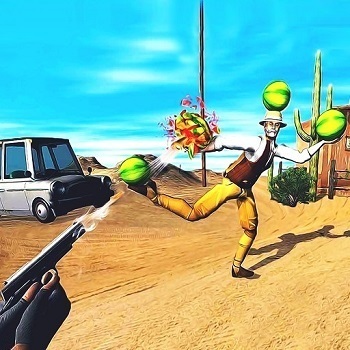
In Watermelon Shooting, line up a shiny handgun and burst wobbling watermelons into juicy red splatter. This fruit-shooting game is a goofy 3D shooter about target practice, not a combat-heavy fight. The targets are watermelons, the mess is cartoonish, and one rushed click can send a shot past the chunky green rinds with nothing but an awkward miss.
The game runs as an HTML5 and WebGL browser game on Desura, so there is no download before you start. It is free online and built for desktop play with mouse controls, giving the handgun practice game a crisp point-and-click feel. When a melon sits far across the stage, the zoomed-in target view can save the shot; skip it too often, and the level slips away one clean miss at a time.
Because the setup is solo gameplay, the pressure comes from your own accuracy and reflexes rather than from enemies rushing the screen. Beginner-friendly does not mean careless, though. A common beginner aiming mistake is firing the moment the barrel moves over the target, but waiting half a beat can be the difference between gooey red splatter and a sad empty pop.
Gameplay
Watermelon Shooting turns casual shooting into a bright little accuracy test with handguns, watermelons, and physics targets that react when hit. Some targets sit close and chunky, while others demand precision aiming from a distance. The bad shots feel loud: the barrel flashes, the melon stays whole, and you know the level just got tighter.
Level progression gives this 3D shooter more than 20 levels, and the layouts gradually ask for cleaner aim. Use zoom aiming when a target is small, partly hidden, or placed deep in the scene. Players who enjoy more serious distance shots can also try Sniper Mission 3d, while Master Archery Shooting offers another precision-based challenge with a different weapon style.
This aim-and-fire game differs from many Shooting Games because the goal is not survival in a battlefield. It is about reading the target, controlling the mouse, and making each shot count. Replay value comes from returning to earlier stages and noticing that a target you once missed now bursts on the first try.
How to Play
Start by moving the mouse until the handgun points at the watermelon target. If the target is close, a steady shot is usually enough. If it is small or tucked into the background, right-click first and use the zoomed-in target view before firing.
Do not chase the target with nervous flicks. Stop, line up the shiny handgun barrel, and then click. One rushed shot can leave a melon untouched, and that tiny mistake feels bigger when the level expects every round to land.
Short-session play value comes from the fast setup: load the browser shooting challenge, clear a few stages, then come back later to improve accuracy. Fans of mouse-based Gun Games may like how it keeps the mood silly while still punishing sloppy aim.
Controls
The controls are small, but every input matters. A mistimed click wastes the shot, while a smart zoom can turn a far green dot into a clean burst of red juice.
- Left Mouse Button — Shoot
- Right Mouse Button — Zoom
- Esc — Pause
Features
More than 20 levels give the watermelon target game a steady climb without turning the screen into chaos. Early stages let you settle your hand. Later layouts make a missed melon sting because you can see exactly where the shot should have landed.
The visual joke is part of the appeal: bursting watermelons, gooey red splatter, and chunky green rinds make every hit feel noisy and silly. The targets break like arcade props, not combat enemies, which keeps the tone light even when your accuracy falls apart.
Replay runs are useful because you can measure improvement by cleaner first shots and fewer zoom corrections. The WebGL shooter rewards calm hands more than wild clicking. Clear a tricky target after three failed attempts, and the red splash feels like a tiny victory.
Similar Games
Watermelon Shooting sits near other browser games where aim, timing, and clean mouse movement matter. If you want a messier fight after practicing on fruit, these Desura games keep the shooting theme while changing the stakes. Miss too often in these, and the pressure comes back much faster than a wobbling melon.
- Cat Gunner Vs Zombies — a cartoon shooter with enemy waves, quick reactions, and constant target switching. It is a good next stop when you want silly visuals but more danger on screen.
- Fire Storm — a side-view shooting game where movement and weapon timing matter together. A bad position can trap you quickly, so it suits players who want more motion with their shots.
- Kogama Real Pvp — a 3D multiplayer shooter built around aiming in open spaces. It shifts from fruit targets to live opponents, so every missed shot can cost you control of the fight.
Advantages
- Light target practice gives you handguns, watermelons, and accuracy goals without a heavy combat theme.
- Zoom-use strategy helps distant shots feel fair instead of random, especially when a melon is barely visible.
- No download means you can start from a browser, play a few quick sessions, and return later to sharpen your aim.
- Cartoon splatter keeps misses funny, but a wasted shot still creates that sharp “I should have waited” moment.
Frequently Asked Questions
What is Watermelon Shooting?
It is a free browser-based 3D shooter where players use handguns to aim at watermelons and complete target-shooting levels.
How do you play the watermelon target game?
You play by aiming with the mouse, shooting with the left mouse button, using right-click to zoom, and clearing watermelon targets across each level.
Can I play this WebGL shooter without downloading?
Yes, it runs directly in a WebGL-supported browser, so you can start instantly and explore more free online shooting challenges on Desura.
Video Gameplay - Watermelon Shooting

 Unicorn Dress Up Girls
 Dig Out Miner Golf
 Princess Beauty Salon
 Catac.IO
 Jewel Blocks
 Snowfall Racing Championship
 Ubisoft All Star Blast
 Dark World
 Tower Lockdown - Teen Titans Go
 Wave Dash : Geometry Arrow
 Vote For Gumball
 Bubble Shooter Classic
 Preco V
 Dead Paradise 3
 Baby Hazel Leg Injury
 Tractors Hidden Tires
 Pixel Driver
 Euro Cargo Transporter Truck Driver Simulator 2019
 Beach Dress Up
 Parking Space
 Pubg Pixel 2
 Johnny Revenge
 Pac Chef
 Zombie Mission 3
 Impossible Bike Racing 3D
 Stinkfly Avoid - Ben 10
 Deep Space Horror: Outpost
 Real City Truck Simulator
 Basket Random
 Knock The Ball
 Mystery Chase - Scooby Doo
 Bakery & Bravery - Adventure Time
 Masha And The Bear In Peace
 Stickman Sniper Tap To Kill
 Toon Cup 2019
 Tank Mayhem
 Cannon Ball + Pop It Fidget
 Football.io
 Body Drop 3D
 Victor & Valentino: Taco Terror
 The Night Begins to Shine - Teen Titans Go!
 Princesses VS Epidemic
 Tom and Jerry: Dont Make A Mess