





Zombie Typing
 Developer: Cat Summer
Published: March 29, 2019
Game Technology: html5, Construct 2
Compatible Devices: Mobile (Android)
About Zombie Typing
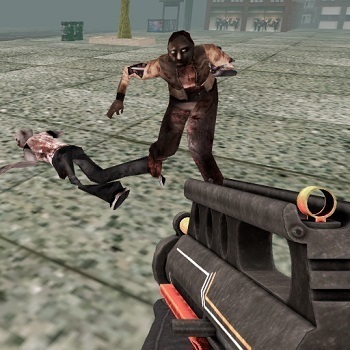
In an overrun city, type each zombie’s word before the horde reaches your last hit point. Zombie Typing turns the cracked city street into a keyboard battlefield, where every glowing word label is a target and every pause gives the shambling undead crowd more room to close in. The survival objective is direct: destroy zombies before they reach you, because once the shrinking HP bar hits zero, the last-stand barricade falls.
This word-based shooter comes from Cat Summer and runs as an HTML5 game made with Construct 2. You can play it in a browser with no download, and the listed platform support includes mobile Android for players who want instant play away from a desktop. Unlike standard entries in the shooter category, attacks happen through typing mechanics instead of aiming a crosshair, so accuracy matters as much as reflexes.
The undead word game also works as casual skill practice because each run shows how panic affects your hands. A common beginner mistake is watching the zombies’ faces instead of reading the words under enemies, and that delay can turn a safe screen into a bite-filled collapse. Players who enjoy undead pressure can also try Zombie Plague for a more traditional survival fight, while fans of word recognition may like Alphabetic Train.
Gameplay
Zombie Typing is built around approaching enemies that carry readable words beneath them. Type the full word correctly, and that zombie is removed before it can attack. Miss a letter, hesitate, or start on the wrong target, and the closest monster keeps dragging itself forward until your hit points take the hit.
The smartest advanced strategy is to scan the closest enemy first, not the largest group. One near zombie can end a run while your eyes chase a longer word in the back row. When two threats arrive together, clear the shorter word if it is closer to the barricade, then snap to the next glowing label before the screen gets crowded.
Replay value comes from watching your typing speed and survival time improve. A run that ended in ten seconds can become a clean holdout once your hands stop rushing bad inputs. For more pressure from undead enemies, Cat Gunner Vs Zombies brings weapon-based wave defense with a similar “don’t let them reach you” tension.
How to Play
To play Zombie Typing, look at the word under the nearest zombie and enter it exactly as shown. The zombie typing challenge punishes sloppy panic, so do not mash keys just because the horde is moving. One wrong start can steal the moment you needed to stop a bite at the barricade.
Keep your eyes low on the glowing word labels instead of staring at the monsters themselves. The readable words are the real targets, and the screen becomes less chaotic once you treat each label like a command. If a longer word appears behind a shorter close threat, handle the close one first or your HP bar may shrink before you recover.
Short attempts are useful for sharpening accuracy, typing speed, and survival instincts. Sit with a comfortable keyboard position, keep your wrists relaxed, and make sure the words are easy for you to read before the first wave gets dangerous. If you want another keyboard-focused option afterward, Circus Words offers a lighter word game rhythm without the same undead danger.
Controls
- Keyboard — Type the word shown under a zombie to kill it.
- Accurate letters — Complete the displayed word before the zombie reaches you.
- HP awareness — Survive by stopping enemies before your hit points run out.
Features
This reflex typing game uses a clear hit points system, so every mistake has a visible cost. The shrinking HP bar makes danger easy to read at a glance, and that matters when three zombies are stepping over the cracked city street at once. When the bar is almost gone, even a tiny typo feels like hearing the barricade splinter.
The visual layout supports fast reading with glowing word labels placed under enemies. That readable spacing is helpful for accessibility because players can focus on the text without searching through clutter. Keyboard comfort also matters; if your hands are tense, the next word can fall apart before the enemy even reaches the center lane.
Difficulty grows through screen pressure rather than complicated menus. More approaching enemies means more decisions, more target switching, and more chances to confuse similar words. Clearing a crowded wave with clean inputs feels earned because one broken letter chain could have turned the run into a last-second loss.
Similar Games
- Zombinators — a zombie-themed driving survival game where the road becomes a danger lane. It fits players who like undead chaos, sudden obstacles, and the feeling that one bad move can wreck the run.
- Fire Storm — a shooting-focused game with fast enemy pressure and quick reactions. Choose it if you want more direct combat after testing your hands in this city survival game.
- Sniper Mission 3d — a precision shooter where timing and target choice decide the outcome. It connects well to the same idea of staying calm when a single mistake can cost the mission.
Players browsing Typing Games on Desura will find that this undead setup gives keyboard practice sharper consequences than a relaxed word puzzle. Fans of Shooting Games may also enjoy how the danger feels familiar, even though the attack button has been replaced by letter-by-letter reactions. That twist is what makes the typing zombie game stand apart: you are not lining up a shot, you are racing the horde with your hands.
Advantages
- Free online play in a browser with no download, so the next run starts without setup while the memory of the last mistake is still fresh.
- Solo play keeps every survival attempt focused on your own accuracy, typing speed, and target choice.
- Readable enemy words make the challenge about reacting under pressure, not guessing what the screen is asking you to type.
- Short survival attempts make improvement easy to notice, especially when a wave that once broke your HP bar becomes manageable.
Frequently Asked Questions
What is Zombie Typing?
It is a free online zombie survival game where you type the word shown beneath each zombie to destroy it before it reaches and attacks you. If you miss too many words, your hit points run out and the horde wins.
How do you play Zombie Typing?
Read the word under each approaching zombie, type it accurately, and clear the closest threats before they reach your barricade. Prioritizing nearby enemies helps prevent sudden HP loss.
Can I play Zombie Typing without downloading?
Yes, it is an HTML5 game that runs instantly in a browser with no download, and mobile Android support is listed for the game. Desura also offers more free online games for players who want another survival, shooting, or word-based challenge.

 Vampire Nose Doctor
 Inca Adventure
 Penalty Challenge
 Top Down Shooter Game 3D
 Adam and Eve GO
 US Army Missile Attack
 Microsoft Jigsaw
 Draw Rider
 CrazySteve.io
 Pill Soccer
 Penalty Shooters 2
 Princess Collective Wedding
 Infinity Battlefield Ops
 Mine-Craft.io
 Santa Racer
 Shoot Paint
 Buger Cooking Food Shop
 Star Battle
 Bob The Robber
 Fireboy and Watergirl 4: The Crystal Temple
 Baby Hazel Newborn Vaccination
 Battleships Armada
 Scared Silly - Clarence
 Bubble Shooter Fruits
 Dirt Bike Trials
 Viking Way
 TrollFace Quest: Horror 3
 Princess e-Girl vs Soft Girl
 Road of Fury Desert Strike
 Killer City
 Balls Rugby Flick
 City Drive
 Snail Bob 8
 Idle Lumberjack 3D
 Express Truck
 Rickshaw Driver
 Jungle Dino Hunter
 Cowboys Vs Robots
 Infinite Steve - Cloudy With a Chance of Meatballs
 Popit Vs Spinner
 City Bus Driver
 Billie Eilish Makeover
 FRAGEN