











Venom Zombie Shooter
 Developer: JulGames
Published: July 19, 2019
Controls: WASD / Space / Mouse / Tab
Game Technology: html5, WebGL
Compatible Devices: Mobile (Android)
About Venom Zombie Shooter
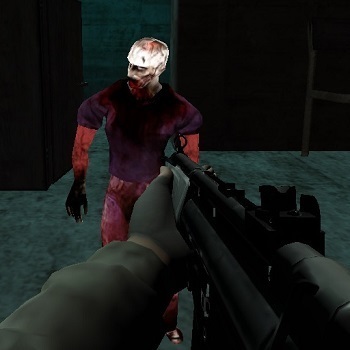
Step into dark mission zones and cut down lunging zombies before they close the distance in Venom Zombie Shooter. This zombie shooter puts you in first-person shooter view, with cracked city streets ahead and undead enemies pushing straight into your line of fire. The pressure rises fast: hesitate too long, and a zombie that looked far away is suddenly clawing into your screen.
Built with HTML5 and WebGL, the browser shooting game supports instant browser play on Desura, including Android mobile access. The good graphics help each mission feel gritty without slowing the pace, from muzzle flashes in tight corridors to scattered weapons lying near danger zones. One wrong turn can box you in, so every reload, jump, and weapon swap matters.
The game is centered on solo gameplay and survival missions rather than complicated team systems. Beginner-friendly controls make the first run approachable, but standing still is the classic beginner mistake. The moment you stop moving, the horde gets angles on you, and a clean shooting lane can turn into a trap.
Gameplay
Venom Zombie Shooter focuses on FPS combat across multiple missions where aiming, shooting, jumping, and weapon switching all feed into survival. Compared with basic target shooters, this mission-based action game feels more urgent because enemies advance, space shrinks, and bad range choices punish you quickly. Keep moving while you fire; if you plant your feet, the next wave can swallow the street before you notice.
Weapon-switching strategy is the big difference. Use heavier weapons when undead enemies crowd the path, then swap to a cleaner option for longer shots instead of wasting seconds on the wrong tool. That split-second choice can save a run when a zombie breaks through the smoke after a burst of muzzle flashes.
How to Play
Move through each mission with your weapon ready, aim before firing, and avoid spraying shots at empty space. Accuracy matters because missed shots create panic, and panic makes players back into corners. When the gap widens, jump over obstacles or shift sideways before the next zombie reaches striking distance.
The WebGL shooter rewards replay value through missions because each attempt teaches safer routes, better weapon timing, and where the pressure points appear. Desktop play gives sharper mouse aiming, while Android mobile play feels more compact and touch-focused. Either way, the danger is the same: one slow reaction can end a promising push.
Controls
Use the controls deliberately, not desperately. The pause menu gives you a breath when the screen gets crowded, but opening it too late will not save you from a zombie already in your face.
- WASD — Move
- Left mouse button — Shoot
- Right mouse button — Aim
- Space — Jump
- Tab — Pause
- 1–7 — Change weapon
Features
Venom Zombie Shooter includes multiple missions with changing enemy pressure, so replaying is not just about repeating the same route. Some areas feel open until lunging zombies arrive from awkward angles, forcing you to rethink where you stand. Clearing a mission after nearly getting surrounded gives the run a sharp, earned finish.
The visual style leans into dark mission zones, cracked city streets, scattered weapons, and bright muzzle flashes against grim backgrounds. These details make threats easier to read while still keeping the screen tense. For players browsing Zombie Games or First Person Shooter titles, this undead survival shooter offers a focused weapon-swapping FPS rhythm.
Similar Games
Players who want more danger after Venom Zombie Shooter can find related survival and shooting choices on Desura. For a vehicle-heavy zombie setup, Zombinators mixes undead chaos with road pressure, where one bad collision can wreck your momentum. If you prefer tactical firing from a distance, Sniper Mission 3d shifts the tension toward careful aim and punished misses.
- Zombie Plague — a zombie survival game built around fighting infection pressure and staying alive as threats close in. It fits players who like undead enemies and mission danger.
- Cat Gunner Vs Zombies — a gun-based zombie game with wave pressure and fast target switching. A late shot can let the horde break through.
- Fire Storm — a shooting game with heavy combat energy and weapon-focused encounters. It is a strong follow-up for players who enjoy aggressive Shooting Games.
Advantages
- Mission structure gives each run a clear objective, so failure feels like a specific mistake to fix rather than random loss.
- Seven weapon slots encourage fast decisions when zombies move from distant targets to close-range threats.
- Solo play keeps every mistake on your hands; if the street collapses around you, there is no teammate to cover the gap.
- Browser and Android mobile access make the free online game easy to start for quick action sessions.
Frequently Asked Questions
What is Venom Zombie Shooter?
It is a mission-based zombie shooting game where players fight undead enemies with multiple weapons in fast first-person combat. If enemies get too close, survival can fall apart in seconds.
How do you play this zombie shooter?
Move through each mission, aim at zombies, shoot accurately, jump when needed, pause with Tab, and switch between weapons using number keys 1 through 7. Keep moving, because standing still gives the horde time to surround you.
Can I play this browser shooting game without downloading?
Yes, it runs in a supported browser without a separate download, making it easy to start free online play on Desura. You can also explore more browser shooters and zombie survival games from the same page.
Video Gameplay - Venom Zombie Shooter



 Vampires And Garlic
 Tom And Jerry Match 3
 Realistic Sim Car Park
 Healing Rush
 Multiplayer Tanks
 Baldi's Basics v1.4.3
 Monster Truck Racing
 Funny Dentist Surgery
 Deads On The Road
 Bubble Shooter Gold Mining
 Skate Hooligans
 Bike Mania
 Skibidi Toilet IO
 Ultimate Robo Duel 3D
 Mafia Wars
 Snack Attack
 Truck Loads Simulator 3D
 Winx Candy Girl
 Unicorn Dress Up Girls
 Mexico Rex
 Princess Cyberpunk 2200
 Late For School Dress Up
 Motor Bike Stunts Sky
 The Driver of a Mining Truck
 Train Jigsaw
 Craig Of The Creek: Hydro Blast
 Fireboy and Watergirl 2: Light Temple
 Ragdoll Football 2 Players
 Balls Out 3D
 Biker Stars Racer
 Supercars Parking
 Jump Joust 2
 Naruto Match 3 Puzzle
 Morning Mayhem - Powerpuff Girls
 Ubisoft All Star Blast
 Masked Forces Zombie Survival
 Skydome
 Pizza Ninja 3
 Glam Dress Up
 Disneyland Fashion
 Parkour Block 2
 City Drive
 Crocword Crossword Puzzle Game