








TrafficControl.io
 Developer: FG Studio
Published: February 21, 2020
Controls: Mouse
Game Technology: html5, WebGL
Compatible Devices: Mobile (Android)
About TrafficControl.io
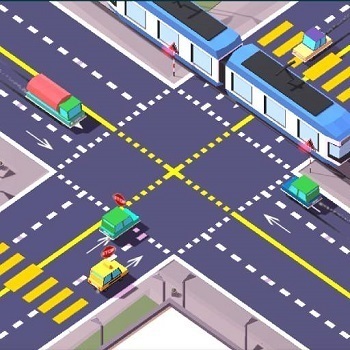
Tap cars through packed intersections and keep TrafficControl.io’s roads from erupting into crashes. This traffic control game throws you into fast traffic management where one lazy pause can turn smooth road flow into a sudden traffic jam. The screen may look manageable for a second, then two braking cars roll toward the same lane and the near-miss bumper moment decides the run.
Created by FG Studio, this browser driving challenge uses HTML5 and WebGL so it plays in a browser with no download. It supports mobile Android and desktop play, giving solo casual players a free online way to test timing without setup. On a small screen, one rushed tap can hit the wrong car, so the pressure feels sharp even before the increasing difficulty kicks in.
The goal is not stopping vehicles forever. Good crash prevention comes from starting vehicles again at the right moment, letting the intersection breathe instead of freezing every lane. If you over-pause, flashing road lanes fill up, cars crowd the edges, and the next release can send traffic into a pileup.
Gameplay
TrafficControl.io turns every intersection into a rapid judgment call. Cars enter from different directions, and your job is to decide which ones keep moving and which ones need a brake. Wait too long, and the packed intersection becomes a trap; move too soon, and two vehicles meet in the center with no room to recover.
The crash-prevention game rewards rhythm more than panic tapping. Watch vehicle spacing, then release one lane while another slows just enough to clear the crossing. That advanced timing strategy feels great when three cars pass cleanly, but one extra second can turn a safe gap into a scraping near miss.
Compared with many traffic-management games, this one pushes fast reflexes instead of long planning menus. Players who like vehicle pressure in Pickup Driver may enjoy how every click here has immediate consequences. Fans of hauling hazards in Tractor Express will recognize the same feeling: control the vehicle flow, or watch the road punish sloppy timing.
How to Play
In TrafficControl.io, click or tap a car to pause it, then tap again when it is safe to move. The intersection management game becomes harder after only a few seconds, so do not stare at one lane for too long. A quiet side road can suddenly feed cars into the center while your attention is stuck elsewhere.
Beginners often make the same mistake: they stop everything. That creates pressure behind each lane, and the first rushed release can send multiple cars forward at once. Instead, keep one direction moving when possible, then use short pauses to shape the road flow before it breaks.
On mobile, use precise taps near the center of each vehicle. If a near-miss bumper situation appears, tap the most dangerous car first, then immediately scan the next lane. This quick reflex game gives you tiny recovery windows, but tapping blindly usually makes the crash happen faster.
Controls
Use light, accurate inputs and keep your eyes moving across every lane.
- Mouse click — stop or start a car
- Tap — stop or release a car on mobile
Features
TrafficControl.io includes short rounds built around score chasing, so every clean stretch feels like a small comeback. The timer-like pressure comes from traffic density, not from extra menus. When the score climbs and the cars arrive tighter together, a single bad release can erase the run in seconds.
The free online traffic game uses clear vehicle states, with stopped cars sitting still while moving cars roll toward the danger zone. Flashing road lanes help you read where attention is needed next. Those visual cues matter when the screen fills and one hidden car slips behind your main decision.
Replay value comes from learning better patterns. You start noticing which lanes should be cleared early, which cars can wait, and when a pause is only creating trouble. Players browsing Driving Games or Car Games on Desura may find this .io-style road game more about nerve and spacing than speed.
Similar Games
TrafficControl.io pairs well with other vehicle games where timing, road awareness, or controlled movement can save a run. These picks are not the same traffic setup, but each one asks you to read motion before disaster lands. One late correction, one bad angle, and the vehicle loses control.
- Alphabetic Train — a train-based game where timing and attention guide progress. It matches the lane-watching mindset of traffic control without using the same road layout.
- Bike Mania — a vehicle control game built around careful movement and quick reactions. It suits players who enjoy recovering from awkward positions before the mistake becomes final.
- Mad Skills BMX 2 — a fast bike challenge where timing matters on every slope and landing. The tension feels familiar when one small input decides whether you stay moving or crash out.
Advantages
- Fast decisions make every intersection feel tense from the first wave of cars.
- Short rounds make failed attempts easy to restart without losing the lesson.
- Crash prevention depends on rhythm, spacing, and lane awareness instead of random luck.
- Mouse and tap controls support both desktop and mobile play with direct vehicle input.
Frequently Asked Questions
What is TrafficControl.io?
It is a free online traffic control game where players stop and start cars to prevent crashes at busy intersections.
How do you play TrafficControl.io?
You play by tapping or clicking vehicles to pause or release them, timing each move so traffic keeps moving without collisions.
Can I play TrafficControl.io without downloading?
Yes, it runs in a browser with no download, and you can play short rounds on mobile or desktop whenever you want another traffic challenge.
Video Gameplay - TrafficControl.io


 Baby Hazel Mischief Time
 Top Model Dress Up
 Star vs the Dungeon of Evil
 Pirate Travel Coloring
 Stickman Ping Pong
 Christmas Sledge
 Zookeeper Caper - Clarence
 Bottle Shooter
 Police Car Chase Crime Racing
 Baby Elsa Puppy Surgery
 The Smurfs Skate Rush
 Baby Hazel Newborn Vaccination
 Vsco Girl Fashion
 Titanic Heartbreak - Teen Titans Go!
 Rumble in the Nightosphere - Adventure Time
 Coach Bus Drive Simulator
 Mission to Monte Macabre - Victor and Valentino
 Fishy Trick
 Jake vs Pirate Run
 Cloudy With A Chance of Meatballs - The Climb
 Basketball Machine Gun
 Baby Hazel In Preschool
 Happy Wheels
 Funny Pong
 Bubble Shooter Candy 2
 Masked Forces
 Stickman Prison Escape
 Killer City
 Taxi Simulator
 Among Rampage
 Winter Clash 3D
 Cannon Man
 CrazySteve.io
 Color Galaxy
 Cellcraft.io
 Draw Climber Online
 Cat Rescue - Apple and Onion
 Real Football Challenge
 My Pony Designer
 Red boy and Blue Girl Forest Adventure
 SpongeBob Coin Adventure
 Ungravity
 BMW M340I XDrive Puzzle