






Fps Simulator
 Developer: JulGames
Published: November 11, 2019
Controls: WASD / Shift / Tab
Game Technology: html5, WebGL
About Fps Simulator
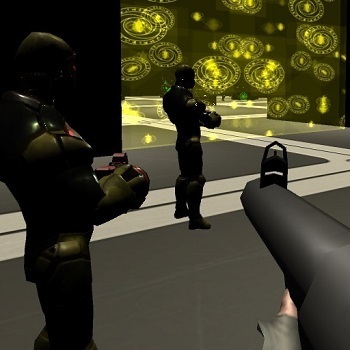
Drop into a compact training arena, grab a weapon, and outmaneuver enemy bots. The pressure starts fast because every open lane can turn into a bad angle. One slow turn, and a bot can catch you before you reset your aim.
This first-person shooter simulator is built around fast movement, weapon handling, and short fights inside a WebGL combat zone. It runs in an HTML5 browser with no download, so desktop players can start with instant play on Desura. The one-eyed Desura mascot may look relaxed, but the arena does not wait.
Fps Simulator treats each encounter like aim practice rather than a full campaign mission. Compared with more objective-based FPS games, the goal here is cleaner: move, react, pick the right weapon, and survive the next bot push. For another browser FPS game with direct player-versus-player pressure, try Kogama Real Pvp.
Gameplay
Arena combat centers on movement control, reflexes, and tactical positioning. Enemy bots can punish players who stand still, especially when scattered weapons pull your attention away from incoming fire. The moment you freeze in the open, the training arena starts to feel much smaller.
Multiple weapons create quick decisions during each run. A weapon pickup can save you when your current option feels weak, but reaching for it at the wrong second may expose your side. Weapon-switching awareness matters because panic swapping can cost the shot you needed.
Quick solo sessions give the game replay value through practice. You can test aim routes, learn where bots tend to appear, and sprint through safer angles after each mistake. If you like heavier weapon combat, Fire Storm also leans into tense shooting pressure.
How to Play
Start by moving before you shoot. Sprinting footsteps can carry you out of a bad lane, but sprinting straight toward a bot usually ends with a rough trade. Angle around cover space, then stop only long enough to line up the shot.
Use the pause menu if the fight becomes messy. That small break helps casual players reset their grip, check the controls, and return with a clearer plan. Rushing back without thinking often means repeating the same mistake in the same spot.
As a weapon training game, the better habit is to treat every bot as a moving target drill. Track first, fire second, then relocate. Fans of zombie target pressure may also enjoy Zombie Plague, where hesitation can let danger close in fast.
Controls
- WASD — Move
- Left Shift — Sprint
- U — Pick weapon
- Tab — Toggle pause
Features
The game includes multiple weapons placed around the arena, giving each attempt a slightly different rhythm. Scattered weapons make the space feel risky because the better option may sit in a dangerous lane. Grab too late, and a bot may already have the angle.
The simulation favors readable FPS practice over long mission structure. There are no complicated objectives pulling attention away from aiming, spacing, and recovery. That makes it useful for players who want a free online shooter focused on reaction training.
Visual clarity is part of the appeal. The WebGL shooting game keeps the combat zone compact, so enemy bots, pickups, and open paths stay easy to read. For more precision-based ranged play outside guns, Master Archery Shooting offers a slower aim challenge.
Similar Games
- Cat Gunner Vs Zombies — a weapon combat game with constant enemy pressure and survival-focused shooting. A missed shot can let the crowd push too close.
- Sniper Mission 3d — a precision shooting game built around careful aim and target control. It suits players who want slower shots where one bad adjustment ruins the attempt.
- Archer Warrior — a ranged combat game with timing, positioning, and enemy threats. It connects well with players who enjoy reading movement before committing to an attack.
Advantages
- Runs in the browser through HTML5 and WebGL with no download required.
- Compact arena design keeps the pressure close and readable.
- Multiple weapons create meaningful pickup choices during combat.
- Pause support gives players a way to reset when the fight gets messy.
- A strong pick for fans browsing Shooting Games or Gun Games on Desura.
Frequently Asked Questions
What is Fps Simulator?
It is a browser-based first-person shooting simulation where players move through an arena, pick up weapons, and fight enemy bots.
How do you play Fps Simulator?
You move with WASD, sprint with Left Shift, pick up weapons with U, and use movement and aim to defeat enemy bots.
Can I play Fps Simulator without downloading?
Yes, it runs in the browser with HTML5 and WebGL, so you can play instantly without installing anything.
Video Gameplay - Fps Simulator


 Penalty Shootout Multi League
 Pong Neon
 Jake vs Pirate Run
 From Nerd To Fab: Prom Edition
 Monster High Beauty Shop Game
 Healing Rush
 Fast Bat's Cars
 OffRoad Truck In The Rain
 Dora Needs Tools
 Bakery & Bravery - Adventure Time
 Lemmings Sling
 Stickman Army The Defenders
 Toon Cup 2019
 Wedding Planner
 Miami Crime Simulator 3D
 Grand Prix Hero
 Squid Fighter
 Bank Robbery
 Kart Stunts
 Stunt Car Driving Pro
 Smiling Glass 2
 Gangster Vegas
 Basketball Strike
 Mr Bullet 2 v2
 City Metro Bus Simulator
 Slope Unblocked
 Pony Pets Salon
 TheWireIO
 Air Force Shooter Sky Strike
 City Minibus Driver
 Noob VS Pro 4: Lucky Block
 City Drift Racing
 Mergest Kingdom
 Among Us - Impostor.iO
 Miami Taxi Driver 3D
 Offroad Jeep Simulator
 Mexican Wrestler Superstars
 Pixie Accident ER
 Baby Hazel Skin Care
 Shoot Your Nightmare: Space Isolation
 Mystic Mahjongg
 Microsoft Jigsaw
 Vikings vs Skeletons